In this article
The Genius categorization model is built in a tree hierarchy structure. Some basic definitions:
- Category - an object that you have defined within the business.
- Sub-category - a further refinement of the category.
- Attributes – The elements of opinion. These are applied to categories and sub-categories, and have their own expressions (go to Attributes for more information).
Categories and Sub-categories
The categories and sub-categories are the main parts of the categorization tree. The categories describe the main touch points of the business, such as 'Staff', 'Store' and 'Product', and these can be broken down into sub-categories that further define these categories. For example “Staff” could be broken down into 'Management', 'Associates', 'Trainees' and 'Other Staff' - , while 'Product' could be broken down into the different products that you offer, or sub-categories based on groups of products.
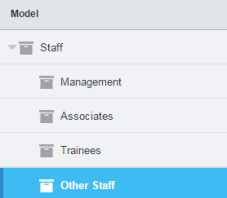
Figure 1 - Example of categories and sub-categories
Expressions are added onto the child nodes - that is the sub-categories that have no further children (in this case Management, Associates, Trainees and Other Staff). This is where you add all the keywords that will add verbatim into that category. Parent nodes - that is the categories that contain leaf or child nodes (Staff in the above example), do not have their own expressions. Their expressions are made up of the expressions of the child nodes joined with an OR Boolean operator.
You can easily see whether your categories or sub-categories contain an expression by looking at the icon in front of the name. If the icon is colored, there is an expression associated with it. If the icon is clear, there is no expression - .
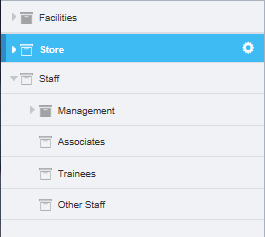
Figure 2 - Example of complete and incomplete categories
In the example above, Management has an expression, but Associates, Trainees and Other Staff do not. Staff is therefore also shown as incomplete because of the incomplete nodes beneath it.
Note: If you add a sub-category to a category that already has an expression, then you will be asked if you want to move the expression to the sub-category you are creating. If you decline this invitation then the expression will be deleted from the parent category.
Warning
To avoid disappointment, save your work at regular intervals, and ensure you save before you leave Model Builder unattended (go to Inactive-Screen Lock for more information).