In this article
Attributes are the elements of the categorization model that you wish to measure; your customers’ opinions. These could be for example Product knowledge, Friendliness, Speed of service of the Staff, Location, Opening hours, Cleanliness of the Store, Availability, Reliability, Variety of the Product etc.
These attributes can only be applied to the lowest node of the tree. Attributes are joined to their category / sub-category nodes with an AND Boolean operator. So the expression that Genius will use for determining if text is referencing the friendliness of management could be:
(manager OR managers OR management OR "mgr" OR supervisor OR "in charge") AND (friendly OR friendliness OR “not friendly”~3)
By analyzing only those verbatim texts that match this expression, Genius can then use its sentiment algorithm to determine the opinion expressed by the customers regarding the friendliness of the manager.
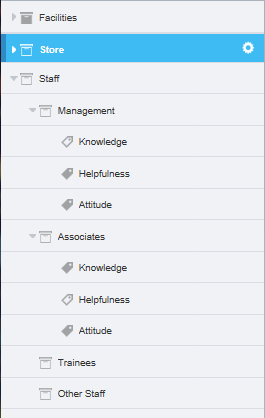
Figure 1 - Example of categories, sub-categories and attributes
The example above - shows the attributes for Management and Associates. Some of the attributes do not yet have expressions, so the icons are shown as empty. The “incomplete” status for the icons is passed back up to the parent node (Staff) so that you can see that there is an empty attribute even when the hierarchy is closed.
Uncaptured Attribute
When setting up the model, you have the option to automatically generate attributes for uncaptured verbatim. This option is also available on the Model Overview page (go to The Model Overview Page for more information). If you select this option, once you have at least one attribute added to the category tree an additional attribute Uncaptured appears in the tree. This automatically shows you all of the verbatim that have been captured by the sub-category expression (“Sales” in the example illustration - ) and excludes the attributes that have already been set up (“Helpfulness” and “Knowledge” in the example illustration). Topic Discovery shows a list of words that are used when the respondent talks about the ‘Sales’ function. You can drill deeper into these words (go to Topic Discovery for more information) in order to find keywords that can be added to existing attribute expressions or new attributes that should be added.
The Uncaptured Attribute is useful for helping to build out your model, so it’s worth switching it on when you’re in model building mode. You can also transfer the results for Uncaptured Attributes through to your reporting (use the ‘ua’ prefix in the Database Designer table). If you do not want these results in your reporting, ensure the toggle is switched off and save your active version so that they are not present in your category list.
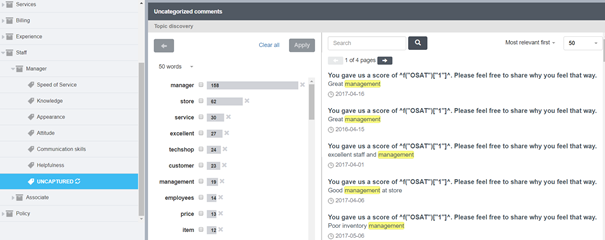
Figure 2 - The Uncaptured attribute and Topic Discovery
The Topic Discovery words are useful in helping to understand whether you are missing keywords for your current attributes or whether you need to define some more attributes based on the frequency of the topics in the Topic Discovery word list (go to Topic Discovery for more information).