In this article
Topic Discovery - is a feature that allows you to see the most frequently used words in your Uncategorized Comments. By default the top 50 words are shown, along with their frequency of appearance, in the left pane. Use the drop-down to select between the top 10, 50, 100 or 200 words. All comments related to the listed words are shown in the results pane on the right. Again, use the drop-down to select between the top 10, 50, 100 or 200 comments.
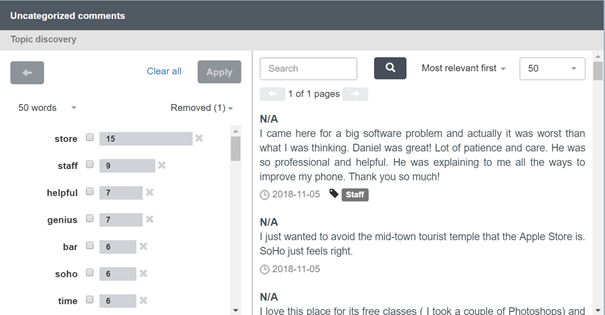
Figure 1 - The Topic discovery pane
To explore and filter the results further:
- If there are words that you do not want to be included in the top words list, for example brand names or company names, remove them from the list by clicking on the X next to the frequency count. If you later decide you need to re-include them in the list, click the Removed button to display a list of removed words, then click Add back for the appropriate word(s).
- To display all the verbatim that include a particular keyword, check the checkbox for the word or words and click Apply. The verbatim that include the selected keyword(s) are then listed in the pane on the right, with the keywords highlighted. A new list of the most used words associated with the now-displayed verbatim is then presented in the left pane. You can repeat this process as many times as you wish to focus in on particular combinations of keywords.
You can use these words to help you to update existing category expressions or to create new categories.
Click Clear all to take one step back in the sequence of filters.