In this article
Once you have saved your model, you can view that model in the ‘Versions’ tab (next to the Design tab on the secondary navigation tab). All your saved versions are available here - . Your sentiment configuration and Concept Miner core version are also shown.
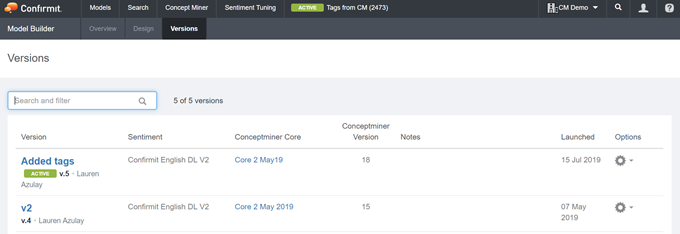
Figure 1 - The Versions tab
A number of options are available from the cog-wheel icons on this page - .
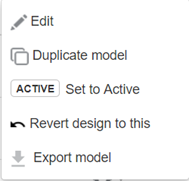
Figure 2 - The cog-wheel options
- Edit - you can edit the description and name of the version from the cogwheel on the main launched versions page.
- Duplicate model - duplicates the version that you’ve selected and creates a new model from that version.
- Set to Active - sets the selected version as the active version for the model
- Revert design to this - takes the selected version and sets it as the current working version. It will revert to the Concept Miner core that was frozen at that point, and take the sentiment configuration from that version. If this is not needed, then revert your model to that version, change the Concept Miner core (if required, or if you’re using the same core, just add any changes) and save the model as a new version.
- Export model - exports the model to an Excel® spreadsheet.